The Fives II - Inputs and Controls
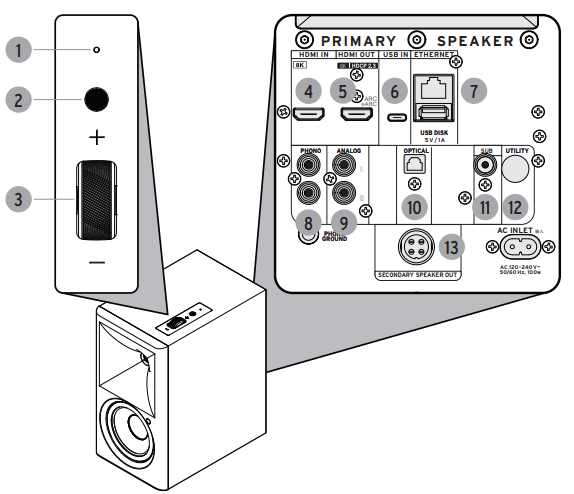
- Power/Source indicator - LED light will be illuminated when the speakers are on. The color will indicate the audio source selected.
- Multifunction button - this button will turn the speakers on, will allow you to cycle through input sources and enter Bluetooth pairing mode.
- Volume Dial - This dial controls volume.
- HDMI IN - HDMI input connection.
- HDMI OUT (eARC) - HDMI eARC connection port used to connect to the TV
- USB Audio input (USB C) - USB C input used to connect to a PC.
- Ethernet - Standard CAT5/6 input to connect the speaker to local network.
- Phono Input - Dual RCA input (with phono preamp built in) to connect to a turntable.
- Analog Input - Dual RCA input to connect line level audio devices (CD, streamers, tape or turntables with built in or external phono preamp).
- Optical Input - Optical/Toslink digital input to connect digital audio sources (TV, CD player, Streamer).
- Subwoofer Output - RCA output to connect a powered wired subwoofer.
- Utility Button - Special function button used for factory reset.
- Secondary Speaker Out - Speaker cable terminal to connect the secondary speaker.
Comments
0 comments
Please sign in to leave a comment.